
Step by step
How it works
Every photo goes through the same steps, from the moment you add the RAW to the signed certificate. Here is what happens, in plain words.
Two ways to check a photo, as in the upload form:
Your RAW is read in your browser
A camera writes two things into every RAW file: the data its sensor recorded, and a small JPEG of its own, the preview you see on the camera’s screen. That preview is the camera’s rendering of the moment of capture, before anyone edited anything.
Your browser opens the RAW and takes out that preview, the camera’s record of the shot (camera, lens, settings, time) and a fingerprint of the file. The RAW never leaves your computer.
Your photo is found in the camera’s frame
Your JPEG is matched against the camera’s preview. We find exactly where it sits in the original frame, even after it was cropped, rotated, straightened or corrected for perspective.
If the two don’t come from the same capture, nothing is rated and nothing is claimed. A photo that can’t be matched gets no score.
The sensor check(not in this check)
Skipped with “Fidelity score only”. The preview still proves your JPEG comes from that capture, but without the sensor data nothing proves the capture itself is real.
The certificate says “Matches the camera preview”: level 1.
Every edit is measured
With your JPEG lined up on the camera’s preview, we measure how far it moved from what the camera recorded: the crop, the rotation (and whether it straightened the horizon), perspective corrections, global tone such as exposure and white balance, local adjustments such as dodging and burning, and sharpening or noise reduction.
Each kind of edit costs points, more the further it goes. The fidelity score is 100 minus those points. It measures how far the photo was edited, not how good it is.
Content changes are looked for
Editing changes how a photo looks; it shouldn’t change what it shows. Before comparing, we account for the look of your edit, so a strong black-and-white conversion or a bold grade isn’t mistaken for a change.
What is left are areas whose content differs from the capture: something removed, added or replaced. They are outlined on the certificate.
Any content change gives the verdict “Content changed”, whatever the score.
Faces are compared
If your photo shows people, each face in your JPEG is compared with the same face in the camera’s capture, to make sure it is the same person. A swapped or replaced face can’t earn a certificate.
The comparison answers one question only: is this the same face? It never identifies anyone, and nothing about the face is stored; the certificate only records whether the faces matched. A face that can’t be found in both is reported as not checked, never as a pass.
A face that isn’t the one the camera captured gives the verdict “Content changed”.
Other traces are checked
Your JPEG is examined for signs of an earlier save, its camera details are compared with the RAW, and Content Credentials (C2PA), when a file carries them, are read and verified. Each check on the certificate says whether it passed, failed or could not run, and why.
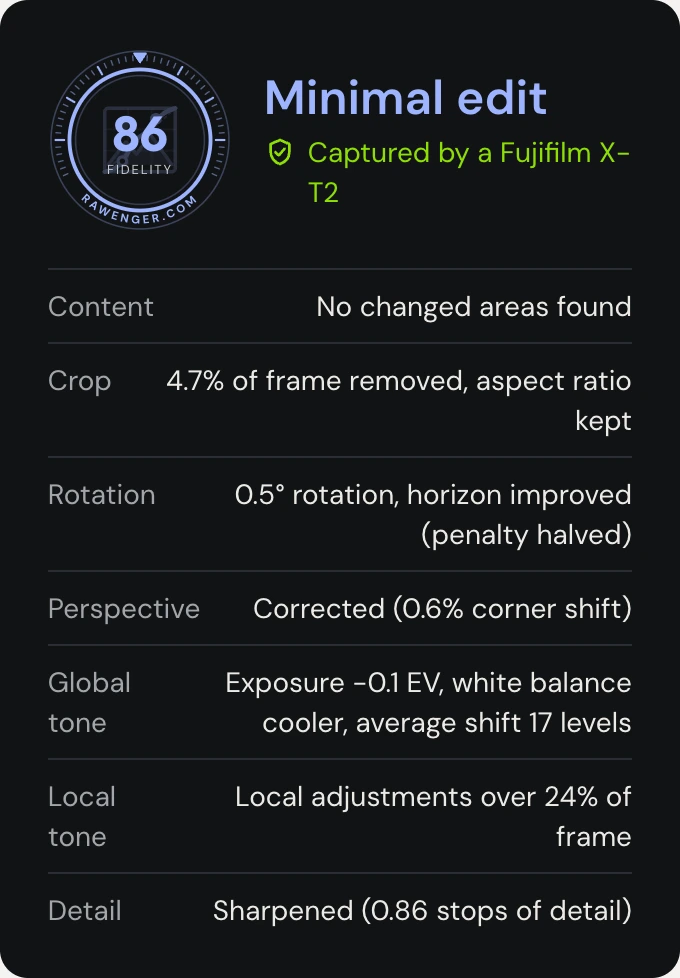
You get a signed certificate
Two answers are kept apart on purpose: that your JPEG matches the camera’s own preview, and how far it was edited. The certificate shows both, with the photo, every measured edit and every check.
It has a public page, a PDF, a QR code and a badge for your site. It is digitally signed: anyone can verify it, even without trusting this site, and any change to it would show. You can make it private or delete it at any time.
Share on your website
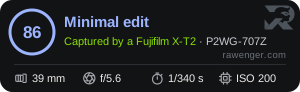
Every certificate comes with a badge for your site, linked to the certificate’s page. Besides the level and the score, it shows the technical details of the shot: focal length, aperture, shutter speed and ISO, read from the RAW file. No more typing them under every photo: the badge does it for you, and the numbers are the camera’s own.
Open the certificate, find “Badge for your site” and click “Copy embed code”. Paste it next to the photo in your website, portfolio or blog post, in any block that accepts HTML (often called “HTML”, “Embed” or “Custom code”). Visitors who click the badge see the certificate.
The badge keeps itself up to date: if you make the certificate private or delete it, the badge says so. On social media, share the certificate’s link or its QR code instead.
Your shot’s settings, filled in for you and proven by the RAW. Nothing to install on your site: the badge is a small image with a link.
Be proud, take the compliments
You nailed it in camera, and now anyone can see it. When people admire your photo, they admire what you really saw and captured, and the certificate says so.
Every certified photo is a small vote for honest photography. Ask for certificates when you judge, commission or publish photos, and show yours with your work. The more photographers do, the more the craft is valued, so the art can go on and on.
November 2026
Tested on real work
Before a change to the analysis goes live, we run it on finished photos from real shoots, delivered to clients, with their RAW files. The latest run:
The shoots range from dark, low-key black and white to bright and colourful, studio and outdoors, edited in Capture One with strong tone work. Removed objects such as a light stand, a tap, leaves and a table leg were found and outlined. Thin or very small retouches can still pass: a removed cable, a small spot, a subtle reshape. We are working on those. It is one photographer’s work, so we will keep testing on more and publish the results here.
Don’t take our word for it
Check us yourself
Signed
Every certificate is digitally signed (Ed25519). Change one letter of it and the signature no longer verifies.
Verifiable without us
Download a certificate’s proof (JSON) from its page, and check it against our public key with any standard tool, offline, without this site.
Versioned
Each certificate names the version of our engine that checked it, and every change to the analysis is listed on the RAWEngine page.
Our public key: rawenger.com/api/keys · Engine history: RAWEngine
What we keep, what we delete
- Your RAW file
- Read in your browser. Only uploaded for the sensor check, and deleted as soon as it finishes; we keep its fingerprint. Details
- Faces
- Compared during the check, then discarded. Never stored, never used to identify anyone. Details
- Your JPEG and the camera’s preview
- Kept to show the result and the certificate, until you delete the certificate or ask us to. Details
- Location
- Only stored if you tick the box, and only shown if you choose to. Details
- Tracking
- None. No advertising, no analytics, nothing loaded from third parties. Details
- Where
- Our servers are in Germany (EU). Details
You can delete a certificate, or your whole account, yourself at any time.
What it can’t see
- Very small edits, and edits in areas with almost no detail, such as a black shadow or a clear sky, can go unnoticed.
- It shows what the camera recorded, not whether the scene was real: a set, a costume or a screen can be photographed honestly.
- It doesn’t identify the photographer, the people in the photo or the place.
Supported cameras
The RAW files of every major camera maker. A file we can’t decode yet is reported as “not checked”, never as a failure, and the comparison with the camera’s preview still runs.
- Canon
- CR2, CR3
- Nikon
- NEF (including High Efficiency), NRW
- Sony
- ARW
- Fujifilm
- RAF
- OM System / Olympus
- ORF
- Panasonic
- RW2
- Pentax
- PEF
- Leica, phones and converters
- DNG
- Samsung
- SRW
- Hasselblad, Phase One
- 3FR, IIQ
Questions
Do you keep my photos?
Your RAW file, no: it stays on your device, or is deleted right after the sensor check. Your JPEG and the camera’s preview are kept for the result and the certificate, until you delete the certificate or ask us to. See our privacy policy.
Does it work with my editor?
Yes. Lightroom, Capture One, Photoshop, darktable or your camera’s own software: we compare the JPEG you export, whatever made it. Keep the camera metadata (EXIF) in the export to have it compared with the RAW too.
What about phone RAW files?
A DNG from a phone works when it carries a preview large enough to compare. Some don’t; you’ll see why on the result page.
What about HDR merges and panoramas?
Certify a single frame. Blending exposures is fine on its own, but a merge also holds what moved between the frames, people or branches, which the camera never recorded as one shot. A merged image is checked against the frame whose preview it is compared with, so anything that differs from that frame shows as a change.
Can AI fool it?
A generated image has no RAW file from a camera to match, so it can’t get a certificate. An AI edit on a real photo is a content change, and it is outlined when it changes what the photo shows. No check is perfect, which is why we pay for every new way through it.
What if my photo can’t be matched?
Then nothing is rated and nothing is claimed: the result says why, for example a very tight crop or a JPEG made from another shot. A camera file we can’t decode yet is reported as “not checked”, never as a failure.
Who is behind Rawenger?
Rawenger is made by Exquillin Digital, a company in Belgium. Our details are in the legal notice, and you can write to us any time.
Why we don’t publish the details
The exact methods and limits stay on our server. Publishing them would show how to tune a fake until it passes. Instead, every certificate names the version of our engine that checked it, and every change to the analysis is listed on the RAWEngine page. And if you find a way through, please tell us through the contact form.

Show that your photos are real.
Certify your first photo in a minute. Your RAW file stays on your device, and the certificate is yours to share.